SharePoint 2010 People Directory Part 2 – Table Layout
I’ve had a couple of requests to extend the people directory I covered in a previous article on How to: Create a Simple SharePoint 2010 People Directory. One request was to show how to display the results in a table based layout. Displaying a basic table like the one shown below is really straightforward and simply involves some modifications to the XSL property of the search results web part.
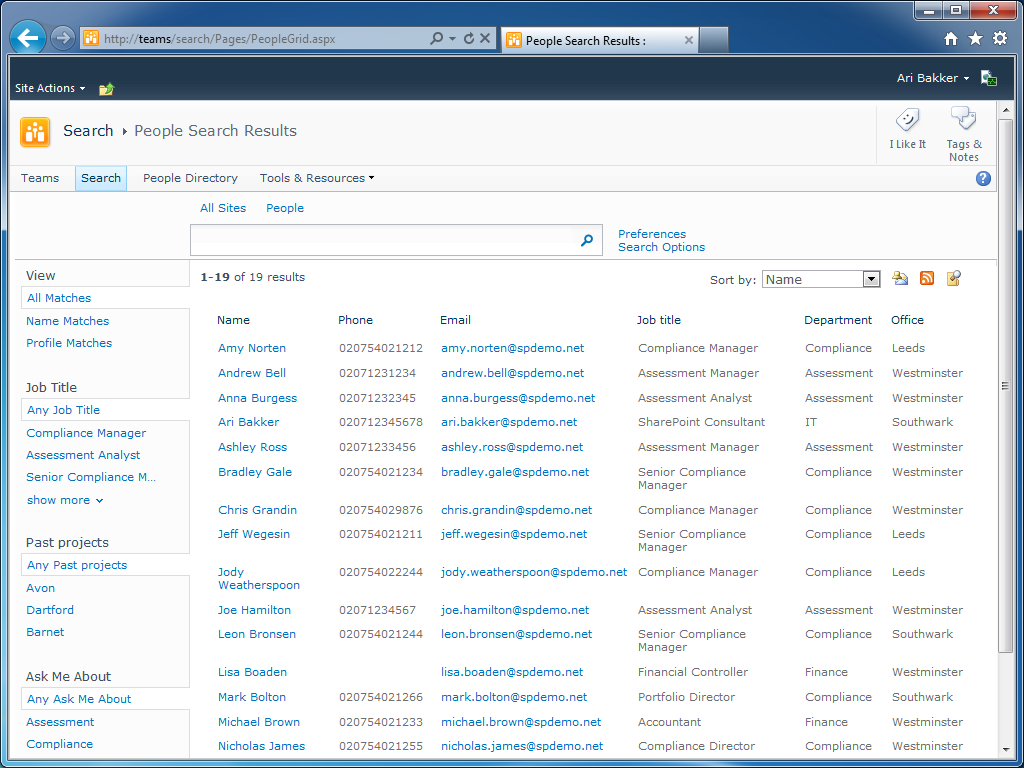
The XSLT used in the example above is shown below.
<?xml version="1.0" encoding="utf-8"?>
<xsl:stylesheet version="1.0"
xmlns:xsl="http://www.w3.org/1999/XSL/Transform"
xmlns:ddwrt="http://schemas.microsoft.com/WebParts/v2/DataView/runtime"
xmlns:asp="http://schemas.microsoft.com/ASPNET/20"
xmlns:SEARCHWC="http://schemas.microsoft.com/searchserver/">
<xsl:output method="xml" indent="no"/>
<xsl:param name="SortBy" />
<xsl:param name="DropDownOption" />
<xsl:param name="RelevanceSortUrl" />
<xsl:param name="RelevanceSortLabel" />
<xsl:param name="SocialDistanceSortUrl" />
<xsl:param name="SocialDistanceSortLabel" />
<xsl:param name="NameSortUrl" />
<xsl:param name="NameSortLabel" />
<xsl:param name="IsNoKeyword" />
<xsl:param name="IsFixedQuery" />
<xsl:param name="ShowMoreLink" />
<xsl:param name="MoreLinkLabel" />
<xsl:param name="MoreLink" />
<xsl:param name="AlertMeLink" />
<xsl:param name="AlertMeText" />
<xsl:param name="SrchRSSText" />
<xsl:param name="SrchRSSLink" />
<xsl:param name="ShowMessage" />
<xsl:param name="ShowActionLinks" />
<xsl:param name="SearchProviderText" />
<xsl:param name="SearchProviderLink" />
<xsl:param name="IsPeopleCoreResultsWebPart" />
<xsl:param name="NoFixedQuery" />
<xsl:param name="NoKeyword" />
<xsl:param name="NoPeopleResults" />
<xsl:param name="NoPeopleResults1" />
<xsl:param name="NoPeopleResults2" />
<xsl:param name="NoPeopleResults3" />
<xsl:param name="NoPeopleResults4" />
<xsl:param name="ParentOrgsLabel" />
<xsl:param name="ViewHiearchyLabel" />
<xsl:param name="RecentContentLabel" />
<xsl:param name="ResponsibilitiesLabel" />
<xsl:param name="SkillsLabel" />
<xsl:param name="InterestsLabel" />
<xsl:param name="PastProjectsLabel" />
<xsl:param name="SchoolLabel" />
<xsl:param name="MembershipLabel" />
<xsl:param name="AboutMeLabel" />
<xsl:param name="BaseOfficeLabel" />
<xsl:param name="SummaryLabel" />
<xsl:param name="ProfileViewLabel" />
<xsl:param name="UpdateProfileLabel" />
<xsl:param name="QueriesFoundYouLabel" />
<xsl:param name="UpdateProfileKeywordLabel" />
<xsl:param name="SelfSearchLabel" />
<xsl:param name="NoKeywordLabel" />
<xsl:param name="AddToMyColleaguesText" />
<xsl:param name="PopupFetcingResultLabel" />
<xsl:param name="IdPrefix" />
<xsl:param name="LangPickerHeading" />
<xsl:param name="LangPickerNodeSet" />
<xsl:param name="FilterNodeSet" />
<xsl:param name="ShowPeopleSortDropdown" />
<xsl:param name="RecentUpdateTabLabel" />
<!-- When there is no keywory to issue the search -->
<xsl:template name="dvt_1.noKeyword">
<span class="ms-sbplain">
<xsl:choose>
<xsl:when test="$IsFixedQuery">
<xsl:value-of select="$NoFixedQuery" />
</xsl:when>
<xsl:otherwise>
<xsl:value-of select="$NoKeyword" />
</xsl:otherwise>
</xsl:choose>
</span>
</xsl:template>
<!-- When empty result set is returned from search -->
<xsl:template name="dvt_1.empty">
<div class="psrch-results">
<xsl:if test="$ShowActionLinks">
<xsl:call-template name="ActionBarTemplate" />
</xsl:if>
</div>
<span class="srch-description" id="CSR_NO_RESULTS">
<xsl:value-of select="$NoPeopleResults"/>
<ol>
<li>
<xsl:value-of select="$NoPeopleResults1"/>
</li>
<li>
<xsl:value-of select="$NoPeopleResults2"/>
</li>
<li>
<xsl:value-of select="$NoPeopleResults3"/>
</li>
<li>
<xsl:value-of select="$NoPeopleResults4"/>
</li>
</ol>
</span>
</xsl:template>
<!-- Main body template-->
<xsl:template name="dvt_1.body">
<div class="psrch-results">
<xsl:if test="$ShowActionLinks">
<div class="srch-sort-right2">
<xsl:if test="$LangPickerNodeSet and count($LangPickerNodeSet) > 0">
<label for="langpickerdd" id="langpickerddlabel">
<xsl:value-of select="$LangPickerHeading"/>
</label>
<select title="{$LangPickerHeading}" class="srch-dropdown" onchange="window.location.href=this.value" id="langpickerdd">
<xsl:for-each select="$LangPickerNodeSet">
<xsl:element name="option">
<xsl:attribute name="value">
<xsl:value-of select="@url"/>
</xsl:attribute>
<xsl:if test="@selected = 'true'">
<xsl:attribute name="selected">selected</xsl:attribute>
</xsl:if>
<xsl:value-of select="@title"/>
</xsl:element>
</xsl:for-each>
</select>
<xsl:text disable-output-escaping="yes"> </xsl:text>
</xsl:if>
<xsl:if test="$ShowPeopleSortDropdown">
<label for="sortbydd" id="sortbyddlabel">
<xsl:value-of select="$SortBy" />
</label>
<select title="{$SortBy}" name="dropdown" onchange="window.location.href=this.value" class="srch-dropdown" id="sortbydd">
<xsl:element name="option">
<xsl:attribute name="value">
<xsl:value-of select="string($RelevanceSortUrl)"/>
</xsl:attribute>
<xsl:if test="$DropDownOption = '0'">
<xsl:attribute name="selected">selected</xsl:attribute>
</xsl:if>
<xsl:value-of select="$RelevanceSortLabel"/>
</xsl:element>
<xsl:if test="string-length($SocialDistanceSortUrl) > 0 and string-length($SocialDistanceSortLabel) > 0">
<xsl:element name="option">
<xsl:attribute name="value">
<xsl:value-of select="string($SocialDistanceSortUrl)"/>
</xsl:attribute>
<xsl:if test="$DropDownOption = '1'">
<xsl:attribute name="selected">selected</xsl:attribute>
</xsl:if>
<xsl:value-of select="$SocialDistanceSortLabel"/>
</xsl:element>
</xsl:if>
<xsl:element name="option">
<xsl:attribute name="value">
<xsl:value-of select="string($NameSortUrl)"/>
</xsl:attribute>
<xsl:if test="$DropDownOption = '2'">
<xsl:attribute name="selected">selected</xsl:attribute>
</xsl:if>
<xsl:value-of select="$NameSortLabel"/>
</xsl:element>
</select>
<xsl:text disable-output-escaping="yes"> </xsl:text>
</xsl:if>
<xsl:call-template name="ActionBarTemplate" />
</div>
</xsl:if>
<table width="100%" class="ms-listviewtable">
<thead>
<tr class="ms-viewheadertr ms-vhltr">
<td class="ms-vh2">Name</td>
<td class="ms-vh2">Phone</td>
<td class="ms-vh2">Email</td>
<td class="ms-vh2">Job title</td>
<td class="ms-vh2">Department</td>
<td class="ms-vh2">Office</td>
</tr>
</thead>
<xsl:for-each select="All_Results/Result">
<xsl:call-template name="SingleResult"/>
</xsl:for-each>
</table>
<xsl:call-template name="MoreLinkTemplate" />
</div>
</xsl:template>
<!-- This template is called for each result -->
<xsl:template name="SingleResult">
<xsl:call-template name="SingleResultInternal" />
</xsl:template>
<xsl:template name="SingleResultInternal">
<xsl:variable name="id" select="id"/>
<xsl:variable name="currentId" select="concat($IdPrefix,$id)"/>
<xsl:variable name="url" select="url"/>
<xsl:variable name="email" select="workemail"/>
<xsl:variable name="sip" select="sipaddress"/>
<xsl:variable name="prefix">IMNRC('</xsl:variable>
<xsl:variable name="suffix">')</xsl:variable>
<xsl:variable name="hassip" select="string-length($sip) > 0"/>
<xsl:variable name="hasemail" select="string-length($email) > 0"/>
<xsl:variable name="haspn" select="string-length(preferredname) > 0"/>
<xsl:variable name="hasydn" select="string-length(yomidisplayname) > 0"/>
<xsl:variable name="hasjt" select="string-length(jobtitle) > 0"/>
<xsl:variable name="hasdp" select="string-length(department) > 0"/>
<xsl:variable name="hasorg" select="string-length(orgnames) > 0"/>
<xsl:variable name="haswph" select="string-length(workphone) > 0"/>
<xsl:variable name="hasonum" select="string-length(officenumber) > 0"/>
<xsl:variable name="hascol" select="string-length(colleaguecategory) > 0"/>
<xsl:variable name="hasacu" select="string-length(addtomycolleaguesurl) > 0"/>
<xsl:variable name="hashier" select="string-length(hierarchyurl) > 0"/>
<xsl:variable name="hasabme" select="string-length(aboutme) > 0"/>
<xsl:variable name="hasresp" select="string-length(responsibility) > 0"/>
<xsl:variable name="hassk" select="($FilterNodeSet and $FilterNodeSet/@title='SPShSkills') or hithighlightedproperties/skills/@hashh > 0"/>
<xsl:variable name="hasint" select="($FilterNodeSet and $FilterNodeSet/@title='SPShInterests') or hithighlightedproperties/interests/@hashh > 0"/>
<xsl:variable name="hasorgparent" select="($FilterNodeSet and $FilterNodeSet/@title='OrgParentNames') or hithighlightedproperties/orgparentnames/@hashh > 0"/>
<xsl:variable name="hasmem" select="($FilterNodeSet and $FilterNodeSet/@title='Memberships') or hithighlightedproperties/memberships/@hashh > 0"/>
<xsl:variable name="haspp" select="($FilterNodeSet and $FilterNodeSet/@title='SPShPastProjects') or hithighlightedproperties/pastprojects/@hashh > 0"/>
<xsl:variable name="hasbol" select="($FilterNodeSet and $FilterNodeSet/@title='SPShLocation') or hithighlightedproperties/baseofficelocation/@hashh > 0"/>
<xsl:variable name="hassch" select="($FilterNodeSet and $FilterNodeSet/@title='SPShSchool') or hithighlightedproperties/schools/@hashh > 0"/>
<xsl:variable name="hassum" select="count(hithighlightedsummary/c0) > 0"/>
<xsl:variable name="hasvlm" select="string-length(profileviewlastmonth) > 0"/>
<xsl:variable name="hasvlw" select="string-length(profileviewlastweek) > 0"/>
<xsl:variable name="hasquery" select="string-length(queriesfoundyou) > 0"/>
<tr>
<td class="ms-vb2">
<xsl:if test="$haspn">
<a href="{string($url)}" id="{concat($currentId, '_CSR')}">
<xsl:apply-templates select="hithighlightedproperties/preferredname" />
</a>
</xsl:if>
</td>
<td class="ms-vb2">
<xsl:apply-templates select="hithighlightedproperties/workphone" />
</td>
<td class="ms-vb2">
<xsl:choose>
<xsl:when test="$hassip">
<a id="{concat($currentId, '_EmailLink')}" href="{concat('mailto:', $sip)}">
<xsl:apply-templates select="hithighlightedproperties/sipaddress" />
</a>
</xsl:when>
<xsl:otherwise>
<a id="{concat($currentId, '_EmailLink')}" href="{concat('mailto:', $email)}">
<xsl:apply-templates select="hithighlightedproperties/workemail" />
</a>
</xsl:otherwise>
</xsl:choose>
</td>
<td class="ms-vb2">
<xsl:apply-templates select="hithighlightedproperties/jobtitle" />
</td>
<td class="ms-vb2">
<xsl:apply-templates select="hithighlightedproperties/department" />
</td>
<td class="ms-vb2">
<xsl:apply-templates select="hithighlightedproperties/officenumber" />
</td>
</tr>
</xsl:template>
<!-- XSL transformation starts here -->
<xsl:template match="/">
<xsl:if test="$AlertMeLink and $ShowActionLinks">
<input type="hidden" name="P_Query" />
<input type="hidden" name="P_LastNotificationTime" />
</xsl:if>
<div class="psrch-Main">
<xsl:choose>
<xsl:when test="$IsNoKeyword = 'True'" >
<xsl:call-template name="dvt_1.noKeyword" />
</xsl:when>
<xsl:when test="$ShowMessage = 'True'">
<xsl:call-template name="dvt_1.empty" />
</xsl:when>
<xsl:otherwise>
<xsl:call-template name="dvt_1.body"/>
</xsl:otherwise>
</xsl:choose>
<xsl:if test="$IsPeopleCoreResultsWebPart and (count(All_Results/Result) > 0 or count(All_Results/FakeResult) > 0)">
<asp:Panel ID="PopupPanelPeopleCore" runat="server" CssClass="psrch-PopupPanel">
<div id="PopupContainer" class="psrch-PopupContainer">
<asp:UpdatePanel runat="server" ID="UpdatePanelPeopleCore" UpdateMode="Conditional" ChildrenAsTriggers="true">
<ContentTemplate>
<SEARCHWC:PeopleCoreResultPopupControl
id="PopupControl51A944753DF0430C8FE1EBAA70F3E945"
runat="server"/>
<div id="PopupFooter">
<asp:UpdateProgress ID="UpdateProgress" DisplayAfter="0" AssociatedUpdatePanelID="UpdatePanelPeopleCore" runat="server">
<ProgressTemplate>
<span id="Progress">
<img class="psrch-UpdateGraphics" src="/_layouts/images/hig_progcircle_loading24.gif"/>
<xsl:value-of select="$PopupFetcingResultLabel" />
</span>
</ProgressTemplate>
</asp:UpdateProgress>
</div>
</ContentTemplate>
</asp:UpdatePanel>
</div>
</asp:Panel>
</xsl:if>
</div>
</xsl:template>
<xsl:template name="ActionBarTemplate">
<xsl:if test="string-length($AlertMeLink) > 0">
<a href="{$AlertMeLink}" id="CSR_AM" title="{$AlertMeText}">
<img src="/_layouts/images/bell.gif" alt="{$AlertMeText}" border="0"/>
</a>
<xsl:text disable-output-escaping="yes"> </xsl:text>
</xsl:if>
<xsl:if test="string-length($SrchRSSLink) > 0">
<a type="application/rss+xml" href="{string($SrchRSSLink)}" title="{$SrchRSSText}" id="SRCHRSSL">
<img border="0" src="/_layouts/images/rss.gif" alt="{$SrchRSSText}"/>
</a>
<xsl:text disable-output-escaping="yes"> </xsl:text>
</xsl:if>
<xsl:if test="string-length($SearchProviderLink) > 0">
<a href="{string($SearchProviderLink)}" title="{$SearchProviderText}" >
<img border="0" src="/_layouts/images/searchfolder.png" alt="{$SearchProviderText}"/>
</a>
<xsl:text disable-output-escaping="yes"> </xsl:text>
</xsl:if>
</xsl:template>
<xsl:template name="GetPicUrl">
<xsl:param name="PicUrl"/>
<xsl:param name="PlaceHolderUrl"/>
<xsl:choose>
<xsl:when test="string-length($PicUrl) < 1 or starts-with($PicUrl, 'file:') or starts-with($PicUrl, '\\') or starts-with($PicUrl, '//')">
<xsl:value-of select="$PlaceHolderUrl"/>
</xsl:when>
<xsl:otherwise>
<xsl:value-of select="$PicUrl"/>
</xsl:otherwise>
</xsl:choose>
</xsl:template>
<xsl:template name="MoreLinkTemplate">
<xsl:if test="$ShowMoreLink = true() and string-length($MoreLink) > 0">
<div id="MoreLink">
<a href="{string($MoreLink)}">
<xsl:value-of select="$MoreLinkLabel"/>
</a>
</div>
</xsl:if>
</xsl:template>
<xsl:template name="RenderNameUrlMultivalue">
<xsl:param name="names"/>
<xsl:param name="urls"/>
<xsl:param name="currentId"/>
<xsl:for-each select="$names">
<xsl:variable name="p" select="position()"/>
<xsl:if test="string-length(.) > 0">
<xsl:if test="$p > 1">
<span class="psrch-TextSeparator"> :: </span>
</xsl:if>
<xsl:choose>
<xsl:when test="string-length($urls[$p]) > 0">
<a id="{concat($currentId, '_MultivalueUrl')}" href="{string($urls[$p])}">
<xsl:apply-templates select="." />
</a>
</xsl:when>
<xsl:otherwise>
<xsl:apply-templates select="." />
</xsl:otherwise>
</xsl:choose>
</xsl:if>
</xsl:for-each>
</xsl:template>
<xsl:template name="RenderSimpleMultivalue">
<xsl:param name="multivalue"/>
<xsl:param name="cutoff"/>
<xsl:for-each select="$multivalue">
<xsl:sort data-type="number" order="descending" select="@hashh"/>
<xsl:variable name="p" select="position()"/>
<xsl:if test="string-length(.) > 0">
<xsl:choose>
<xsl:when test="$p = 1">
<span id="Multivalue">
<xsl:apply-templates select="." />
</span>
</xsl:when>
<xsl:when test="$p > 1 and $p <= $cutoff">
<span class="psrch-TextSeparator"> :: </span>
<span id="Multivalue">
<xsl:apply-templates select="." />
</span>
</xsl:when>
<xsl:when test="$p = $cutoff + 1">
…
</xsl:when>
</xsl:choose>
</xsl:if>
</xsl:for-each>
</xsl:template>
<xsl:template name="HitHighlighting">
<xsl:param name="hh" />
<xsl:apply-templates select="$hh"/>
</xsl:template>
<xsl:template match="ddd">
…
</xsl:template>
<xsl:template match="c0">
<b>
<xsl:value-of select="."/>
</b>
</xsl:template>
<xsl:template match="c1">
<b>
<xsl:value-of select="."/>
</b>
</xsl:template>
<xsl:template match="c2">
<b>
<xsl:value-of select="."/>
</b>
</xsl:template>
<xsl:template match="c3">
<b>
<xsl:value-of select="."/>
</b>
</xsl:template>
<xsl:template match="c4">
<b>
<xsl:value-of select="."/>
</b>
</xsl:template>
<xsl:template match="c5">
<b>
<xsl:value-of select="."/>
</b>
</xsl:template>
<xsl:template match="c6">
<b>
<xsl:value-of select="."/>
</b>
</xsl:template>
<xsl:template match="c7">
<b>
<xsl:value-of select="."/>
</b>
</xsl:template>
<xsl:template match="c8">
<b>
<xsl:value-of select="."/>
</b>
</xsl:template>
<xsl:template match="c9">
<b>
<xsl:value-of select="."/>
</b>
</xsl:template>
</xsl:stylesheet>
To get a search results page to use this simply copy and paste it into the XSL Editor property of the people search core results web part. Note that you need to uncheck the ‘use location visualization’ checkbox before the XSL Editor property is enabled.

A couple of other properties you may want to change are the Default Results Sorting (e.g. to sort by name) and the Results Per Page properties.
If you want to make further changes to the layout (to add further columns for example) you just need to change two places in the XSL file. The first is the dvt_1.body template that is marked with <!– Main body template–>. This template defines the column headings to use as shown below:
<table width="100%" class="ms-listviewtable">
<thead>
<tr class="ms-viewheadertr ms-vhltr">
<td class="ms-vh2">Name</td>
<td class="ms-vh2">Phone</td>
<td class="ms-vh2">Email</td>
<td class="ms-vh2">Job title</td>
<td class="ms-vh2">Department</td>
<td class="ms-vh2">Office</td>
</tr>
</thead>
<xsl:for-each select="All_Results/Result">
<xsl:call-template name="SingleResult"/>
</xsl:for-each>
</table>
Adding a new td row will make a new column heading show up. To add the data in each result row we also need to update the SingleResultInternal template in the XSL file. I would suggest looking at the default XSL file and copying the relevant data into the custom XSL. For example to add a ‘Skills’ column you would add the following markup to the end of the template:
<td class="ms-vb2">
<xsl:call-template name="RenderSimpleMultivalue">
<xsl:with-param name="multivalue" select="hithighlightedproperties/skills"/>
<xsl:with-param name="cutoff" select="5"/>
</xsl:call-template>
</td>
Note that in this example I’ve removed a lot of the default XSL code so many of the properties that are normally displayed for each result are not included. You can obviously add these back in by reviewing the default XSL file and adding the ones you find useful in your scenario.
The column headings are also simply static text and don’t allow sorting or filtering in the way lists and library views do. In a subsequent post I hope to show how to get some additional sorting options working with this layout such as sorting by last name.


Ari,
Really nice post, can see that it will be very useful. Just looking through the XSLT and intregued by the namespace xmlns:SEARCHWC=”http://schemas.microsoft.com/searchserver/”.
Have you had a look at what kind of functions are available through this library?
Cheers
Simon
Simon Doy
15 Jun 11 at 3:05 pm
Thanks Simon, I took a look at the http://schemas.microsoft.com/searchserver namespace but as far as I can tell the people search results web part doesn’t actually load any XSLT extension functions for this namespace. I did notice, however, that the control registers the SEARCHWC prefix to allow it to load controls in the Microsoft.Office.Server.Search.WebControls namespace (such as the PeopleCoreResultPopupControl) that are embedded in the XSLT. I’m only speculating here but potentially they were intending to use extension functions for this so put in the extra XSLT namespace but for whatever reason decided to do this differently.
Ari Bakker
15 Jun 11 at 5:10 pm
Ari,
Cheers for reply and looking into it.
I was wondering what cool extension functions there were in that assembly. Reminds me of when I starting look at all the functions in the ddwrt namespace.
Might have to unpack some of those assemblies see what else is in there!
Cheers
Simon
Simon Doy
15 Jun 11 at 11:36 pm
Nice post Ari!
Stupid question.. but how do you get this to display more than 10 results? it seems to ignore the Results Per Page field in Web Part Options.
cheers, Neil
Neil Phillips
20 Jul 11 at 8:33 am
@Neil thanks. That property should work for up to 50 results but that is as many as you can show by default with the search results web part. Any number above 50 won’t work and will default back to 10 results. I haven’t tried it but Brendan Newell has a post on how to get around this limit using the search web service and a data view web part at http://brendannewell.com/musings/?p=208.
Ari Bakker
20 Jul 11 at 9:21 am
Hi Ari,
I have followed the steps but I still get the standard view, I have unchecked the “Use Localisation Visualization” checkbox but the tabular view is not displayed is there something obvious I’m missing?
Cheers
David
David Spriggs
28 Sep 11 at 2:26 am
@David did you follow the steps in the previous article how to create a simple SharePoint 2010 people directory before trying the steps above? I’ve tried this on several envrionments and it works for me – are you seeing any error messages?
Ari Bakker
2 Oct 11 at 9:40 pm
Hi Ari,
just got this working there was a typo in the code. Thanks. However I am still having trouble with the refiner panel, I posted a reply to the part one of your article.
Cheers
David
David Spriggs
5 Oct 11 at 10:54 pm
Hi
how can I suppress certain service accounts?
got the SharePointSearchCA account and that one aren’t in the OU that gets imported from AD…
Taenkeren
12 Oct 11 at 1:40 pm
@Taenkeren if you are seeing service accounts I would double check that the synchronization connection does not include the service account OU (assuming service accounts are in a separate OU) and either do a full import or delete them from the list of user profiles. If there isn’t a separate OU you can perform additional filtering by selecting ‘edit connection filters’ from the synchronization connections screen.
Ari Bakker
12 Oct 11 at 2:12 pm
I have a problem with this webpart. When I create people directory + customize xsl everything works fine; unfortunately webpart keeps crashing frequently. Edit webpart -> Apply fixes the problem, but webpart keep chrashing. Does any one has any idea how to solve this problem?
tp
29 Nov 11 at 7:13 am
@tp what error message are you getting when it crashes? Also are you able to see detailed error messages in the ULS logs?
Ari Bakker
29 Nov 11 at 7:43 am
I don’t get error description (correlation id), but gibberlish instead of table-based layout. It seems for me that ‘gibberlish’ equals unformatted user information.
tp
29 Nov 11 at 8:55 am
David Spriggs – What was the typo in the code? I am having the same problem with the page still showing the old format. Thanks!
jriesen
14 Dec 11 at 8:53 pm
I hope I managed to solve my problem. Seems like I got an xsl error because I confiqured the webpart _and_ moved the page.
tp
15 Dec 11 at 8:59 am
Ari – can you update the code snippet on this page to address the typo in the code that David Spriggs mentions? I would like to see if this table layout will solve an issue that we have with employee directory. Thanks!
jriesen
15 Dec 11 at 3:01 pm
I figured it out. The second line of code is missing required white space. It is shown as…
<xsl:stylesheet version="1.0"xmlns:xsl="http://www.w3.org/1999/XSL/Transform"xmlns:ddwrt="http://schemas.microsoft.com/We…
and needs to be…
Hope that helps the next person who runs into the problem.
jriesen
15 Dec 11 at 4:15 pm
<xsl:stylesheet version="1.0" xmlns:xsl="http://www.w3.org/1999/XSL/Transform" xmlns:ddwrt="http://schemas.microsoft.com/WebParts/v2/DataView/runtime" xmlns:asp="http://schemas.microsoft.com/ASPNET/20" xmlns:SEARCHWC="http://schemas.microsoft.com/…
Sorry this did not display in my last post.
jriesen
15 Dec 11 at 4:16 pm
Hello. Can you tell me how to use last name as default sorting option?
tp
22 Dec 11 at 7:31 am
Hi,
I was trying to add columns and instead of displaying the full name i tried to display Last Name and First name separately but it doesnt seem to work..
I also added Company and City section but i cant seem to retrieve the value.
here is the section which i changed apart from the header
THANKS FOR THE HELP. 🙂
Ais
29 Feb 12 at 12:13 pm
Hi,
thank you very much for your help. I’m trying to add more data to results like other phone numbers but I dont know how to add, I can’t find thoese properties.
Thanks again
Jesus
21 Jun 12 at 12:47 pm
Did you ever post anything about column sorting?
Kristian
18 Sep 12 at 2:45 pm
Hi,
I’m trying to add the mobilephone section and I tried to follow the examples above but it’s not working. I see the column but mobilephones are not populating.
Thanks in advance.
CW
12 Oct 12 at 1:06 am
@CW the example above uses the workphone search managed property – are you using the workphone property or another managed property? It could be worth checking that this is a) populated in the user profiles and b) populated in the search index. Let me know if you need more information on this.
Ari Bakker
16 Oct 12 at 7:47 pm
Hi,
Fantastic article. I was able to set up a directory in a short amount of time. I have mine set up in this table layout format. I would like to have presense available for the people listed in the table. I can’t quite figure out what code I need to put in the xml to show presence for the people. Can you assist?
Thanks
Georgi
12 Nov 12 at 7:35 pm
Thanks so much for this!
I work at a school and would to implement this for a staff directory. Only problem is, the list displayed also includes students. How do I change it so that only staff are shown?
Terry
22 Nov 12 at 10:49 pm
@Terry to filter the results you can adjust the search query that the core results webpart uses by changing the ‘append text to query’ property. E.g. by changing the query from ‘contentclass:spspeople’ to ‘contentclass:spspeople AND workemail:”@contoso.com”‘ only people with a email address that ends in @contoso.com would be returned. If you have a user profile property that indicates whether a user is a staff member or student you can use that in your query by creating a search managed property and using that in the query e.g. UserType:Staff but this depends on whether you have configured such a property.
Ari Bakker
26 Nov 12 at 2:14 pm
Can you please give a code example of how to read in mobile phone numbers or office location?
James
4 Dec 12 at 8:23 am
Hi Ari
Do you have figured out the column headings issue;
So they allow sorting or filtering in the way lists and library views do ?
Taenkeren
17 Dec 12 at 10:46 am
This works very nice, thank you. Have you ever thought about how you could save the search results from a table view to something like a csv or text file? We moved the employee directory from Excel and then found that some users like to print out the directory to pin to their cubicle wall.
Brian
14 Jan 13 at 5:01 pm
After digging around I realized, Duh, Right click in the table view and Export to Microsoft Excel. You have to add additional Data From Web links because the max number of people in the view is 50. So in my case 3 links in the spreadsheet get me all 128 people. The other neat trick is to edit the data range properties and refresh the data when opening the file. I did a little formatting and saved it back to a doc lib. Then add a link on the Search page to download the file. One printable phone list for the wall.
Brian
15 Jan 13 at 1:04 am
Great posts Ari – Thanks
I found that pasting the code directly caused the “missing whitespace” errors referred to above but if you paste it into Word first and then into the web part all is fine.
Also adding additional filtering criteria definitely requires the “AND” to be capitalised.
Ari – do you still have plans to develop this?
Does anyone now of any good explanations of the functionality of the “Core Search” and refiner web parts?
Bill
25 Jan 13 at 8:44 am
Sir as you put it at the end of this article.
“In a subsequent post I hope to show how to get some additional sorting options working with this layout such as sorting by last name.”
Have you put this together yet?
Peter
25 Jan 13 at 5:56 pm
Hi
How can I make sure the result gets listed in alphabetic order?
Taenkeren
30 Jan 13 at 3:33 pm
[…] sorting following my previous posts on creating a simple SharePoint 2010 people directory and using a table based layout for a SharePoint 2010 people directory. This post shows how to implement custom sorting for the people directory so you can sort by first […]
SharePoint 2010 People Directory Part 3 - Sorting at SharePoint Config
5 Feb 13 at 1:12 pm
@tp, @Taenkeren, @Bill, @Peter I posted on how to add additional sort options at SharePoint 2010 People Directory Part 3 – Sorting
Ari Bakker
5 Feb 13 at 10:09 pm
This is great thanks Ari. just created on SharePoint Online and it works but I don’t get the Sort by, or search boxes.
I think SharePoint Online blocks alot of the code 🙁
Have you a better solution for Sharepoint Online that will show the ‘search box’ and ‘Sort By’?
nick
25 Feb 13 at 9:06 pm
@nick my suggestion would be to wait until your SharePoint Online site is upgraded to SharePoint 2013 as the default search core results web part in SharePoint 2013 allows you to configure sorting options without deploying custom code.
Ari Bakker
25 Feb 13 at 9:47 pm
Hi =)
I have a qustion.
I want to add a column with the thumbnail picture of the user.
I modified the xls, to that the column exists, and createt a meta entry for this picture pointing on Person:PicutreURL(Text).
But i dont work 🙁
If i pointing on for example lastname, the last name is showing, so the code is correct.
Any idea which parameter or metaentry is showing the picture?
Shay
5 Jul 13 at 11:00 am
I will like to display picture in the tabular display.
Will putting Picture do this job?
Thanks
Bisi
13 Sep 13 at 9:04 am
I will like to display picture in the tabular display.
Will putting “”PictureURL” do this job?
Thanks
Bisi
13 Sep 13 at 9:06 am
Bisi. Where you ever notified on how to accomplish this. Id like to do the same thing? Thanks
EPW
31 Jan 14 at 8:32 pm
I am trying to narrow down the search.
Department:”IT” AND Department:”Compliance”
works just fine!
But the following one doesn’t.
Department:”IT” AND Department:”Compliance” AND Department:”Assessment”
Any ideas?
Uni
8 Apr 14 at 7:35 am