Indicative SharePoint 2010 Licensing Costs
SharePoint licensing is a complex subject. As well as there being multiple product configuration options, license prices often depend on a number of factors such as the type of organisation, the relationship with Microsoft and/or licensing retailer etc. It is useful, however, to have a rough indication of how much a product will cost when planning a project. For example if you are interested in giving all internal users access to FAST search you are looking at roughly twice the licensing costs of an installation using the standard features.

Photo by anadelmann / CC BY-NC-ND 2.0
SharePoint 2010 Beta Exams Available
The Born to Learn Blog just announced that registration is now open for the SharePoint 2010 beta exams. Head over to their blog to get the registration codes as these let you take the test for free and if you pass you get the full certification. The idea is you do the TS one first and the PRO one is a bit more tech lead/architect based.
I think the exams are a great way to learn about more than what you focus on day-to-day as they cover a wide range of features included in the SharePoint platform. So if you have been working with SharePoint for a while now is a great chance to have a shot as there is nothing to lose (apart from a bit… Continue reading SharePoint 2010 Beta Exams Available »
SharePoint Evolution Conference Findability Slides
Last week I presented at the SharePoint Evolution Conference in London. I’ve put my slides on slideshare for my session on ‘creating a tag driven information architecture using SharePoint 2007’. In the session I focused on making things findable, both in SharePoint 2007 and SharePoint 2010.

10 ways SharePoint 2010 improves findability
Findability is one of the most important factors in the success of a SharePoint site. If users cannot find what they are looking they will quickly use alternate methods to get results. Employees that cannot find information are less productive and less likely to use the system in general. Likewise users that cannot find information on an internet site will look elsewhere for products and services losing the company revenue.
SharePoint 2007 introduced some powerful tools for improving findability but fell short when it compared to larger Enterprise Content Management systems. SharePoint 2010 takes this a huge step forward with cutting edge enterprise ready findability features. Here are 10 new features SharePoint 2010 brings to the table in addition to the features available in SharePoint 2007.

Securing the authentication cookie for mixed SSL SharePoint sites
This is the fifth in a series of posts detailing how to configure a partially SSL secured SharePoint site. This post will cover what is involved in ensuring the authentication cookie is only sent via a secure channel (i.e. SSL/HTTPS). This is best practice for securing forms based authentication but has several impacts that can require some fundamental changes to the site so are worth considering early in the development process.

Photo by a_funk / CC BY-NC-ND 2.0
Partial SSL SharePoint Sites – Login over HTTPS from HTTP pages
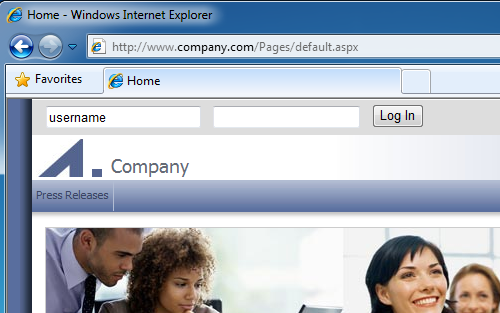
This is the fourth in a series of posts detailing how to configure a partially SSL secured SharePoint site. In the previous post we covered how to secure the login page so it is always delivered via SSL. This is fine for some pages but a common requirement for many public facing SharePoint sites is to have a login form that allows users to log in from any page. By default this is not secure as HTTP pages will send these details back via HTTP (i.e. in clear text), unless we configure the page to do otherwise. This post will cover how we can cater for this scenario without having to use SSL for the entire site.
Enforcing the correct protocol for partially SSL secured SharePoint sites
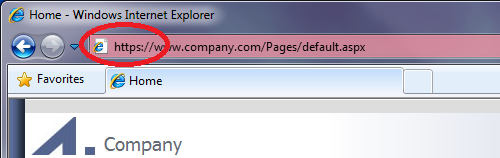
This is the third in a series of posts detailing how to configure a partially SSL secured SharePoint site. In the previous post we covered how to enable SSL for the site. In this post we will cover how to force connections to use the correct protocol (HTTPS for sensitive data, HTTP otherwise). This is required so that if a user tries to browse to page that sends or displays sensitive data via HTTP (e.g. http://www.company.com/pages/login.aspx) they will be redirected to the HTTPS version of the page (e.g. https://www.company.com/pages/login.aspx – so they can login securely) and vice versa for pages like the homepage that should be delivered via HTTP so they do not incur the performance hit of encrypting and decrypting the page.

Photo by nord_modular / CC BY-NC-SA 2.0
Configuring a SharePoint website to allow SSL connections
This is the second in a series of posts on securing mixed SSL sites in SharePoint. This post will cover how to configure a SharePoint forms based web application to allow SSL/HTTPS connections. The process involves setting up an SSL certificate and configuring IIS and SharePoint to allow requests over HTTPS.
The following steps assume that you have a SharePoint web application already set up using forms based authentication. If you need details on how to do this see the article on Technet titled “Forms Authentication in SharePoint Products and Technologies”. We will be using IIS 7 in this example but a similar process can be followed using IIS 6 using the SelfSSL utility.
Securing mixed SSL sites in SharePoint
Public facing SharePoint websites often contain a combination of content that is publicly available, and sensitive content that should only be shown to authenticated users (e.g. personal details like email, address and other account information). While SSL provides a mechanism for delivering the sensitive content over a secure connection it also has a performance overhead. This often results in a requirement to partially secure the site using SSL/HTTPS, but deliver the remainder of the site via HTTP. This is the first in a series of posts that show how you can accomplish this scenario using SharePoint.

Photo by piet_musterd / CC BY-NC-ND 2.0
SharePoint 2007 Development Tips
Before getting into SharePoint 2010 I’d like to recap on some of the things I’ve learnt using SharePoint 2007. Much has progressed since I started working on SharePoint 2007 Technology Adoption Program (TAP) projects using the SharePoint 2007 Beta versions in early 2006. As a developer some of the biggest improvements I’ve noticed are the availability of tools and information.
In 2006 we were creating WSP files by manually maintaining DDF files and using makecab, a process that is now fully automatable (and integrated into Visual Studio) using freely available tools such as the brilliant WSPBuilder utility. I also remember spending two whole days trying to create a list definition as the documentation on MSDN wasn’t (and still isn’t) complete. Not surprisingly the ‘Creating a Custom SharePoint 2007 List Definition’ blog post I wrote afterwards still draws in over 1500 page views a month.
So below are a list of some of the ways I like to do things when creating custom SharePoint 2007 solutions (with a focus on Web Content Management). Continue reading SharePoint 2007 Development Tips »
